英文字母

英文字母
英文字母

中文打字

中文打字

自我介紹  

顯示具有 學校硬體 標籤的文章。 顯示所有文章

2021年3月11日 星期四

win10 開機慢

 https://www.reneelab.net/solved-windows-10-slow-boot.html

2019年4月10日 星期三

when win7 met c000009c

from 

https://support.microsoft.com/zh-tw/help/884070/disk-error-causes-a-program-to-crash-in-windows-xp-windows-server-2003

Step 1: Restart your computer

When you restart your computer, Windows will automatically check your disk for errors, and Windows will try to recover any files that are located on damaged areas on the disk.

If the problem persists after you restart your computer, try Step 2.

Step 2: Scan your hard disk for errors

Run the Chkdsk.exe program to try to recover files from any damaged areas of the disk. To do this, follow these steps:
  1. Click Start, click
    Run, type cmd, and then click
    OK. A Command Prompt window opens.
  2. Type chkdsk /r, and then press ENTER.

    You are prompted to schedule Chkdsk to run when the computer restarts.
  3. Press Y, and then press ENTER.
  4. Restart your computer. During startup, Windows will scan your disk for errors, and Windows will try to recover any files that are located on damaged areas on the disk.
If the problem persists after Windows starts, try Step 3.

Step 3: Contact your hardware manufacturer

If Steps 1 and 2 did not resolve the problem, your best bet may be to contact the manufacturer of your computer or your hard disk. The manufacturer may have a utility that you can use to perform a more detailed scan for damaged areas of the disk. However, be aware that the damage to your hard disk may be serious. Sometimes this means that your only solution is to replace your hard disk.

2018年6月25日 星期一

Fly Audio HT100 家庭劇院組

flyaudio HT-100 5.1

https://item.ingping.com/4154.html

http://www.inchen.com.tw/goods.php?act=view&no=856

2018年1月15日 星期一

電腦出現 Pri Master Hard Disk:S.M.A.R.T Status BAD

Pri Master Hard Disk:S.M.A.R.T Status BAD, Backup and Replace

==>硬碟該換

reference from http://ofeyhong.pixnet.net/blog/post/147590485-%E3%80%90%E9%9B%BB%E8%85%A6%E7%B6%AD%E4%BF%AE%E3%80%91%E7%A1%AC%E7%A2%9F%E6%95%91%E6%8F%B4%E3%80%80%E3%80%80%E3%80%80%EF%BC%88%E5%AF%A6%E9%A9%97%E6%80%A7%E8%B3%AA%EF%BC%89

2017年3月29日 星期三

HERAN禾聯 65型 液晶顯示器(HC-65DA1)

http://buy.kuaisou.com.tw/products-7031392.htm

2015年10月21日 星期三

nas適合當web server 嗎???

在新增了記憶體之後,NAS雖然好好運作了一個禮拜,正當以為問題解決了,後來問題還是依舊,只要線上人數一變多,NAS就會掛掉,一個晚上可以掛好幾 次,我有觀察到,每次NAS要掛掉之前,記憶體的使用量會突然的爆增,大約10秒內記憶體就會耗盡,此時,NAS就會整個掛掉,連用SSH都無法登入,就 只能關掉重開。

資料來源 


==>若要架站 那就自己乖乖拿電腦主機來架站 nas 就當samba了
===================================================
=====================================================
=========================================================

使用openmediavault 來架nas

openmediavault原始網站

教學網站


====
1.使用 virtualbox 安裝
   1)安裝 的 a/c是 root   密碼自訂
      web 連接的原始 a/c是 admin    密碼是openmediavault (登入後可自行修改)

   2) 因使用 虛擬機 nat 所以 ip 是10....
       要改成同網段才可上網
       參考凍仁資料

       sudo vi /etc/network/interfaces
 1 auto lo
 2 iface lo inet loopback
 3 
 4 auto eth0
 5 iface eth0 inet static  # 固定 (靜態) IP。
 6 address 140.127.ooo.xxx # IP 位址。
 7 netmask 255.255.255.0   # 網路遮罩。
 8 gateway 140.127.qqq.ppp # 預設閘道。


  修改完後 $ sudo /etc/init.d/networking restart 

  3)dns 也給我設定是10.X.X.X
     那就修改
     /etc/resolv.conf
     nameserver 168.95.1.1
   
    重啟動networking
   /etc/init.d/networking restart
 

2015年6月22日 星期一

2015年4月8日 星期三

又是...可能是 臨時停電


另一臺電腦主機ok ,但這一台則停擺 ,可能是 AVR有問題 該換了!!!

2015年3月27日 星期五

DPH-150SE

 DPH-150SE 的原始設定 是sip.tn.edu.tw <<<===(我想可能是台南縣網的設定)


 一直等了二個多小時還是網路電話不通

就 改成          163.26.2.3 ==>結果 ... ...ok


2015年3月19日 星期四

lcd字幕

ip 192.168.1.10

hub 192.168.1.101
安裝軟體 先設螢幕屏


如何得知 電腦和lcd字幕有連線成功


2015年2月21日 星期六

block youtube use virgoir 2925

drayteck ==> http://www.draytek.com/en/faq/faq-security/security.content-security-management-(csm)/ how-to-block-youtube-with-url-content-filter-和-dns-filter /

https://www.youtube.com/watch?v=wiBIGveziV4

http://www.ublink.org/index.php/2-uncategorised/230-vigor2925-csm-dns-filter-gmail-facebook

先查youtube的ip

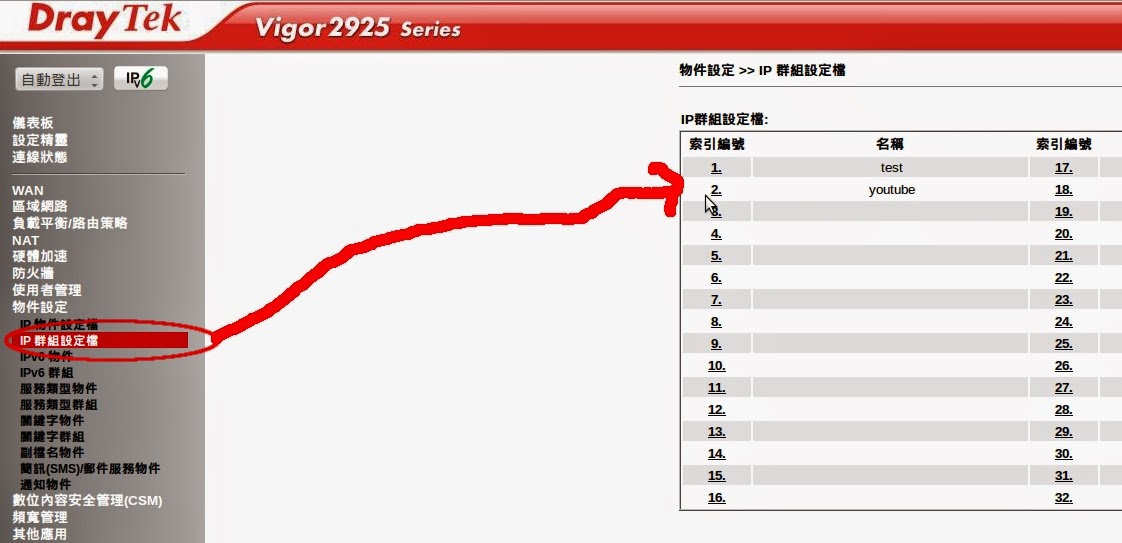
2.使用vigor 2925 block目標ip
    1)物件設定
    2)防火牆==>過濾器設定

=====================

先查youtube的ip


     dig @ 168.95.1.1 www.youtube.com.tw

     ; << >> DiG 9.8.1-P1 << >> @ 168.95.1.1 www.youtube.com.tw =
; (找到1個服務器)
;; 全局選項:+ cmd
;; 答案:
;; - >> HEADER << - opcode:QUERY,status:NOERROR,id:211
;; flag:qr是什麼意思QUERY:1,ANSWER:5,AUTHORITY:0,ADDITIONAL:0

;; 問題部分:
; www.youtube.com.tw。在一個

;; 解答:
www.youtube.com.tw.39159在CNAME youtube-ui.l.google.com。
youtube-ui.l.google.com.29 IN A    74.125.203.93
youtube-ui.l.google.com.29 IN A     74.125.203.136
youtube-ui.l.google.com.29 IN A     74.125.203.91
youtube-ui.l.google.com.29 IN A     74.125.203.190


2.使用vigor 2925 block目標ip
   1)物件設定
       a)ip物件設定檔


      b)ip群組設定檔


           2)防火牆==>過濾器設定


2015年1月21日 星期三

光電轉換器壞掉???

今天是下學期第一天 就給我一個surprise !!!!!!!!
電腦教室網路不通!!!!!!
只好一個一個 慢慢來排除 搞到最後 只剩下 光電轉換器還沒除錯 (因為燈號 都正常),
換上新的光電轉換器 ok !!!可以上線
==>得到一個結論 光電轉換器的燈號 也會騙人!!!

壞掉的設備


之前購入的設備


2014年12月22日 星期一

螢幕大風吹

20141222 10:30
1.原本為電腦教室螢幕      移至人事室
2.原本為 人事室 螢幕        移至一丁沈老師教室
3.原本為 一丁沈老師教室 移至 電腦教室展覽

2014年9月1日 星期一

雷擊!!!所有電器請迴避

今天有同事問我星期天什麼雷擊 (就看上圖啊!!!)
================================()
今天一早來學校 早就心裡有譜了.......
電話不通 (ccc. tsin-tsiànn hó ,bô-lâng tshá guá)
網路不通 (一些特定區域齊響應 ,但...tiān-náu kàu-sik 無影響)
行政單位的電腦有些也...
就... 連...播放音樂的設備也有問題...
災情慘重...

2014年8月26日 星期二

四丙四丁網路整理記要

四丙 只有 b-17(換至hub 42) 可以使用
四丁 只有 b-18 (換至hub 39)可以使用